How to Fine-Tune LLMs on Your Own Data
Learn the complete process of fine-tuning large language models for your specific use case, from data preparation to deployment.

Fine-tuning allows you to customize large language models for your specific domain or task. This comprehensive guide covers everything from data preparation to model deployment.
When to Fine-Tune
Fine-tuning makes sense when:
- You need domain-specific knowledge (medical, legal, technical)
- You want a specific writing style or tone
- You need consistent output formatting
- Prompt engineering alone isn’t sufficient
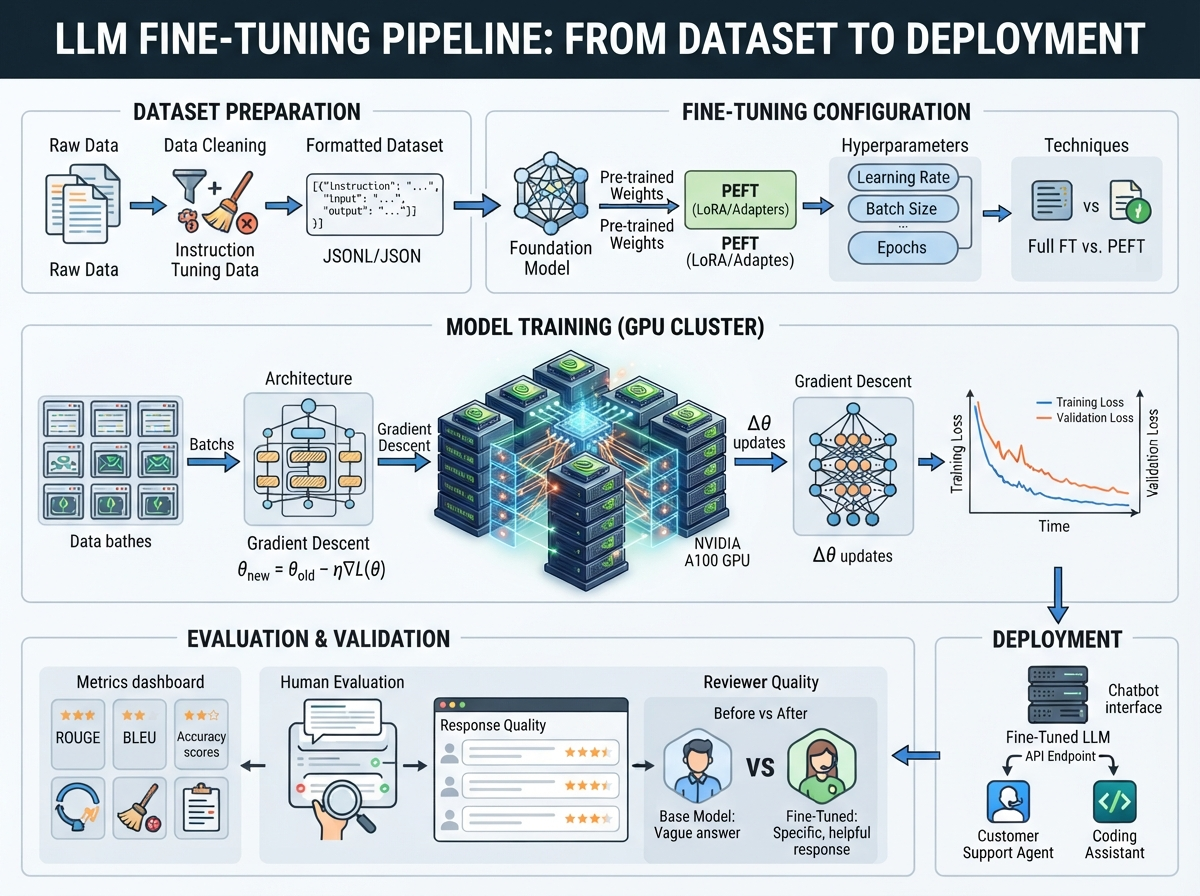
Step 1: Prepare Your Training Data
Your data should be in JSONL format with prompt-completion pairs:
{"prompt": "What is the capital of France?", "completion": "Paris is the capital of France."}
{"prompt": "Explain quantum computing", "completion": "Quantum computing uses quantum bits..."}
Data Quality Tips:
- Aim for 500-1000 high-quality examples minimum
- Ensure consistency in format and style
- Include diverse examples covering edge cases
- Remove duplicates and low-quality entries
Step 2: Choose Your Platform
OpenAI Fine-Tuning:
- Easiest to use
- Supports GPT-3.5-turbo and newer
- Pay-per-token pricing
Hugging Face:
- More control and customization
- Support for open-source models
- Requires more technical expertise
Cloud Providers (AWS, GCP, Azure):
- Managed fine-tuning services
- Integration with existing infrastructure
- Professional support available
Sources & Resources
APIs & Platforms
- OpenAI Fine-tuning - https://platform.openai.com/docs/api-reference/fine-tuning
- Anthropic Claude - https://www.anthropic.com/claude
- Hugging Face Fine-tuning - https://huggingface.co/docs/transformers/training
Libraries & Frameworks
- PyTorch - https://pytorch.org/docs/stable/index.html
- TensorFlow - https://www.tensorflow.org/
- PEFT - https://github.com/huggingface/peft
Learning Resources
- Hugging Face Course - https://huggingface.co/course/
- Fast.ai - https://www.fast.ai/
- Papers with Code - https://paperswithcode.com/
- Cloud Provider ML Services Documentation
- Transfer Learning Research Papers
- Industry Best Practices and Case Studies
- Enterprise-grade infrastructure
- Better for large-scale deployments
Step 3: Fine-Tune Your Model
Using OpenAI’s API:
import openai

# Upload training file
file = openai.File.create(
  file=open("training_data.jsonl", "rb"),
  purpose='fine-tune'
)

# Create fine-tuning job
job = openai.FineTuningJob.create(
  training_file=file.id,
  model="gpt-3.5-turbo",
  hyperparameters={
    "n_epochs": 3
  }
)
Monitor progress:
openai.FineTuningJob.list()Step 4: Evaluate Your Model
Test your fine-tuned model with:
- Held-out test data
- A/B comparison with base model
- Real-world usage scenarios
- Edge cases and error handling
Step 5: Deploy and Monitor
Once satisfied:
- Deploy to production environment
- Monitor usage and costs
- Collect feedback for future iterations
- Set up logging and analytics
Best Practices
- Start with a small dataset and iterate
- Use validation sets to prevent overfitting
- Monitor for bias and unwanted behaviors
- Keep your training data updated
- Document your fine-tuning process
Cost Considerations
Fine-tuning costs include:
- Training tokens (one-time)
- Inference tokens (ongoing)
- Storage for fine-tuned models
For most use cases, fine-tuning is cost-effective when you need consistent, high-quality outputs at scale.
You now have the knowledge to fine-tune your own LLM. Start small, iterate often, and always validate your results!
Related Articles
How to Fine-Tune Large Language Models
Complete guide to adapting pre-trained LLMs to your specific domain and use cases.
How to Build Scalable AI Data Pipelines
Step-by-step guide to building production-ready data pipelines for machine learning.
How to Implement AI Governance Frameworks
Comprehensive guide to establishing governance policies and oversight for AI systems.